
Every Monday you'll know where your studio's revenue comes from and what to focus on to grow
From front-desk sales to renewals in the app: Fitune turns your studio's activity into clear action lists, with no spreadsheets to build at the end of the month.
Reports don't stop at abstract dashboards; they give you names: who has a pending payment, who is about to stop coming and who to congratulate on their first class.
So you run your studio with full clarity on your revenue and a list of the clients to follow up with.
%25208.41.15%25E2%2580%25AFp.m..png)
Go from reviewing numbers to knowing exactly what to do today
Collect what's owed without chasing anyone
Win clients back before you lose them
Turn a first class into a client
Personal touches that build loyalty
All your reports in one place, ready to use

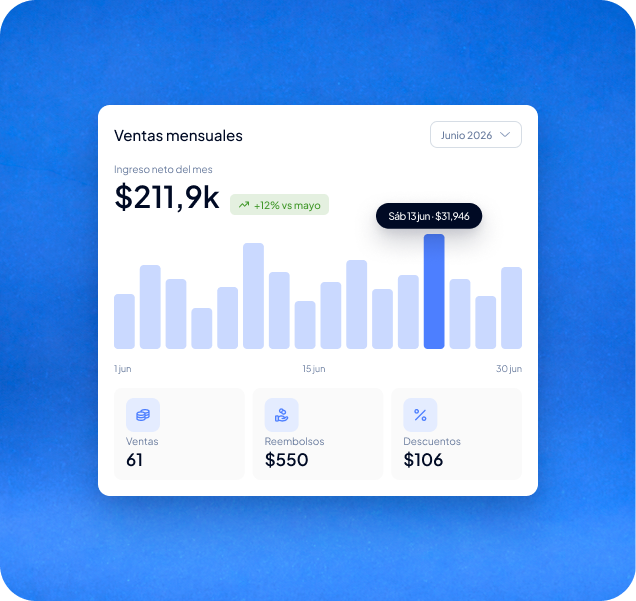
Your real revenue, day by day
Revenue, number of sales, refunds and discounts for every day of the month. See which days you sell most, whether a promotion worked and how much you earned after refunds, without working the numbers out by hand.

Where every sale comes from
Every order with its channel (website, point of sale or automatic renewal), payment status, payment method and the team member who sold it.

Renewals with no surprises
Plan, frequency, automatic membership renewals, cycle dates and each client's status. The upcoming expirations report shows you which plans are about to expire.
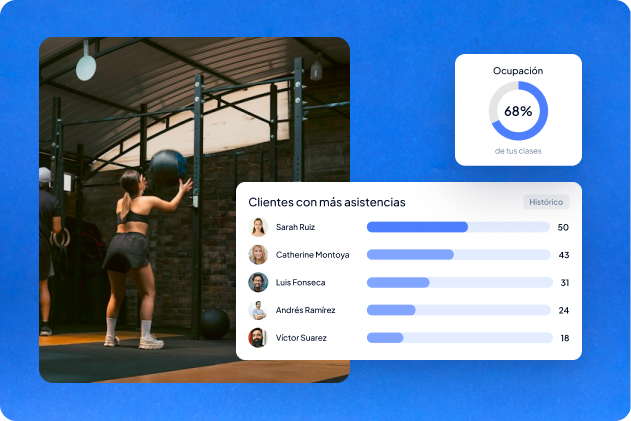
Who actually comes to your classes
Total attendance, unique clients, attendance rate and booking activity over time. Class and appointment booking reports show attendance, cancellations and who cancelled.
Studios already
attracting clients

Frequently asked questions
Which reports does Fitune include?
Finance, bookings, classes, appointments, memberships, contacts and video reports. For example:
- Monthly sales,
- All sales (orders),
- Money owed by clients,
- Memberships and packs,
- Expired memberships,
- Latest attendance
- and Contact birthdays.
Can I see whether a sale was made online or at the front desk?
Yes. Every order shows the channel it came from (website, point of sale or automatic renewal), the payment method and the person who processed it.
How do I know which clients stopped coming?
The expired memberships report shows who let their plan lapse in the last 30 days. Your home page also shows clients with an active membership who haven't come in for weeks.
Can I see who owes me money?
Yes. The money owed report lists every client with an outstanding invoice, the amount and its status.
Can I export my reports?
Yes. Every report on the platform can be downloaded directly to Excel or CSV.
Can my team see the reports?
Yes, depending on their role. Owners, admins and staff with the “Analytics” permission can see reports. Your whole team sees the home dashboard, but only people with that permission see total sales.
Do I need to set anything up to see my reports?
No. Reports and the home dashboard are built from the sales, bookings and memberships you already record in Fitune.
Can I filter reports?
Yes. Most reports can be filtered by client, date, service, instructor, location or membership type.
Know your real revenue and where every sale comes from.
Spot expired memberships, inactive clients and first classes with no follow-up, and reach out at the right moment with their history at hand. All connected to Fitune.

The operating system to help your studio win.